

Quick Answer: The best free website to watch videos together online in 2026 is WatchAlong.me. It requires no sign-up, no browser extension, works on all devices (desktop and mobile), and synchronizes YouTube, Vimeo, Dailymotion, and HLS streams with built-in video chat and zero lag.
Whether you're miles apart from your best friend, in a long-distance relationship, or just want to binge a series with your group chat — watching videos together online has never been easier. The best part? You don't need to pay anything, install software, or even create an account on most of these platforms.
Here are the 10 best websites to watch videos together online for free in 2026, ranked by ease of use, supported sources, and overall experience.
1. WatchAlong.me — Best Overall (No Sign-Up, No Lag)
WatchAlong.me is the fastest way to start a watch party in 2026. You paste a video link — YouTube, Vimeo, Dailymotion, HLS streams, or a direct `.mp4` URL — and you get a shareable room link instantly. No account. No browser extension. No download.
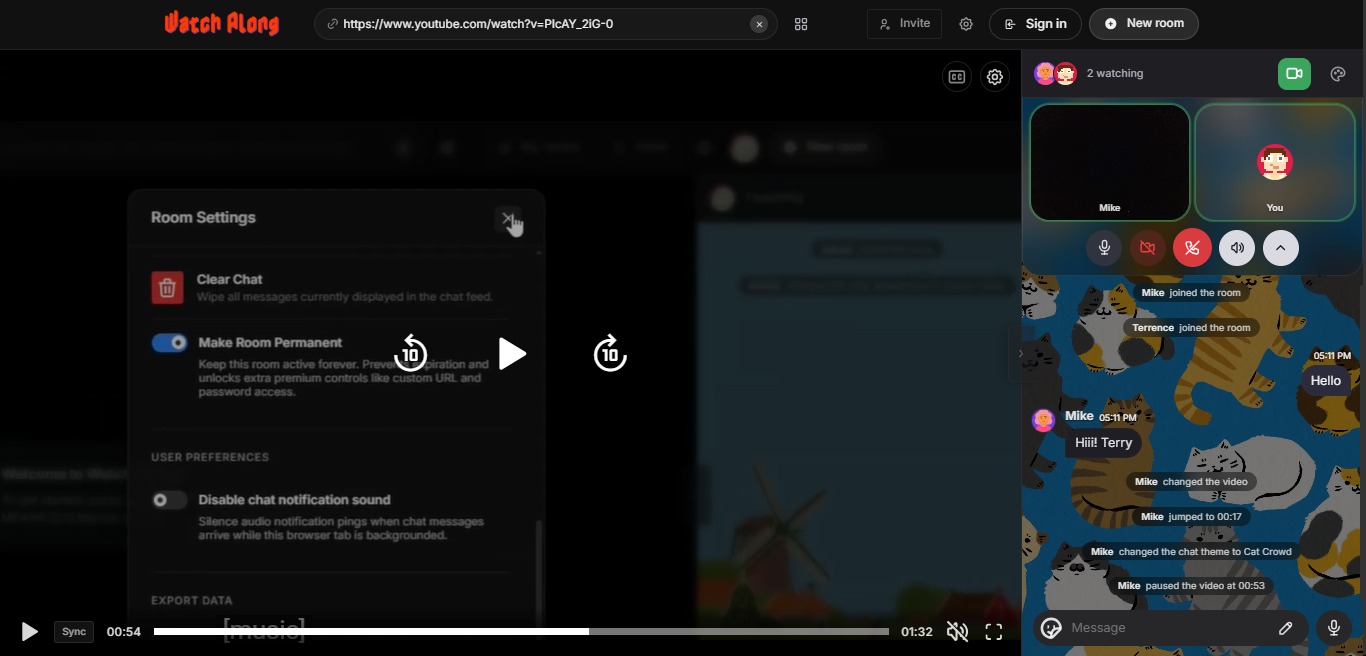
Video: How to create a WatchAlong.me room and watch together in sync
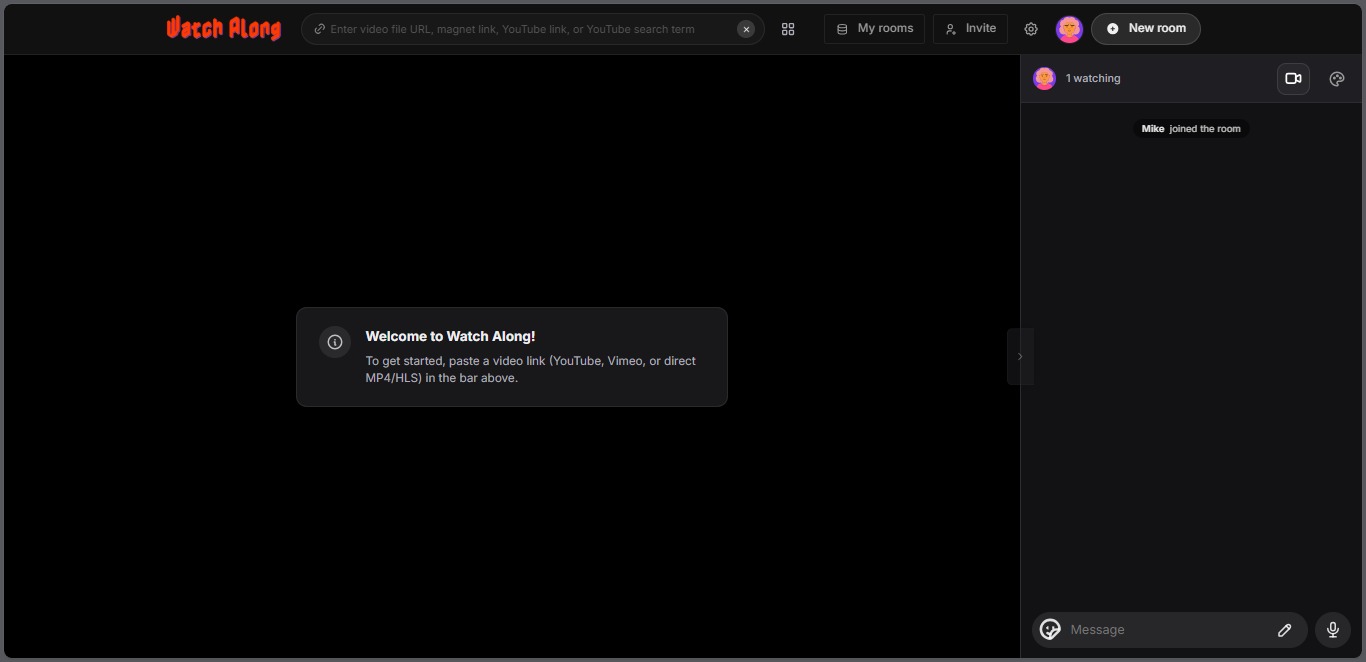
Why it stands out: - Supports YouTube, Vimeo, Dailymotion, HLS, and direct video URLs - Built-in video chat and text chat in one window - Zero-lag real-time sync — everyone watches the same frame - Works on any browser, including mobile
Start a free watch party on WatchAlong.me
If you want to know how to get the most out of it, check our guide on how to watch YouTube videos with friends online or how to video chat while watching a movie together.
2. Teleparty (formerly Netflix Party)
Teleparty is a Chrome browser extension that syncs Netflix, Disney+, HBO Max, Hulu, and Amazon Prime Video playback across multiple users. It includes a text chat sidebar and a group icon system.
Pros: Works with major streaming platforms Cons: Requires Chrome extension, everyone must have the same streaming subscription, limited to a few platforms
Looking for something without the extension? See our full breakdown of Teleparty alternatives in 2026.
3. Watch2Gether
Watch2Gether has been around since 2010 and is one of the most recognizable watch party platforms. It supports YouTube, Vimeo, Twitch, Dailymotion, and SoundCloud.
Pros: Long-established platform, decent YouTube support Cons: Dated interface, requires sign-up for some features, less reliable sync
Curious how it stacks up? We break it all down in our Watch2Gether alternatives guide.
4. Kosmi
Kosmi goes beyond video sync — it's a full virtual room with video chat, audio, and even retro games. Great for friend groups who want more than just watching.
Pros: Feature-rich virtual rooms, video chat included Cons: Requires an account, heavier interface, can feel overwhelming for simple watch sessions
5. Rave
Rave is a mobile app that lets users watch Netflix, YouTube, and Google Drive content together. It's popular with mobile-first users.
Pros: Great on mobile, large user base Cons: Mobile-only, requires accounts, not ideal for desktop users
6. Hyperbeam
Hyperbeam offers a shared virtual browser — meaning everyone controls the same "virtual computer" in the cloud. You can browse and watch anything together.
Pros: Works with literally any website Cons: Can be expensive, latency depends on server location, overkill for simple video sync
7. Syncplay
Syncplay is an open-source desktop application for syncing media player playback locally. It's beloved by tech-savvy users and anime communities.
Pros: Extremely accurate sync, works with local files Cons: Requires software download and configuration, not beginner-friendly
8. Discord (Go Live / Screen Share)
Discord's Go Live feature lets you stream your screen to a voice channel. Many friend groups already use Discord, making this a zero-friction option.
Pros: Your friends are already on Discord Cons: Screen sharing compresses video heavily, audio sync issues are common, viewers are passive (no real sync)
9. Metastream
Metastream is an open-source browser extension for watching streaming services together, with support for Netflix, YouTube, and Amazon Prime.
Pros: Open-source and privacy-friendly Cons: Extension required, smaller community, occasional compatibility issues
10. Zoom / Google Meet (Screen Share)
In a pinch, you can share your screen on Zoom or Google Meet and play a video. It technically works but it's the worst option for video quality.
Pros: Everyone already has it Cons: Heavy compression, audio desync, high bandwidth use, not designed for this use case
If you want to understand why screen sharing fails for video, read our guide on 5 ways to watch a movie with someone online for free — we explain the better options in detail.
The Verdict
For most people, WatchAlong.me wins on every metric — it's free, instant, requires no downloads, and supports more video sources than any competitor. Whether you're watching movies as a couple or hosting a virtual movie night for your group, it's the best place to start in 2026.