

Watching a movie with someone is about more than the film. It's about the reactions — the laughter, the shared suspense, the "wait, did you see that?" moments. When you're watching online with someone who's far away, keeping those reactions visible makes the whole experience feel alive.
Here's how to video chat while watching a movie together online — and why the setup matters more than most people realize.
The Problem with the Obvious Approach
Most people's first instinct is: "I'll just Zoom and then screen share the movie." It's a reasonable idea, but it falls apart in practice.
Why Zoom + screen share fails for movie watching: - Dual bandwidth load: Running a video call and playing a video stream at the same time eats through your connection, leading to buffering on both ends - Compressed video quality: Screen sharing compresses the image — your friend sees a blurry, low-framerate version of the movie - Audio desync: Video call audio and screen-shared video audio frequently drift apart - Only you control playback: Your friend can't pause, rewind, or seek — they're stuck as a passive viewer
It technically works, but it's a noticeably worse experience than a proper watch party platform.
The Right Way: All-in-One Watch Party with Video Chat
The cleanest solution is a platform that combines synchronized video playback and video chat in a single window. No tab switching, no double-bandwidth problem, no audio desync.
WatchAlong.me does exactly this.
How WatchAlong.me Video Chat Works
When you create a watch room on WatchAlong.me, you get:
- A synchronized video player — everyone sees the same frame at the same time
- A video chat window — see your friend or partner's face while watching
- A text chat sidebar — type reactions without interrupting the audio
- All of this in one browser tab
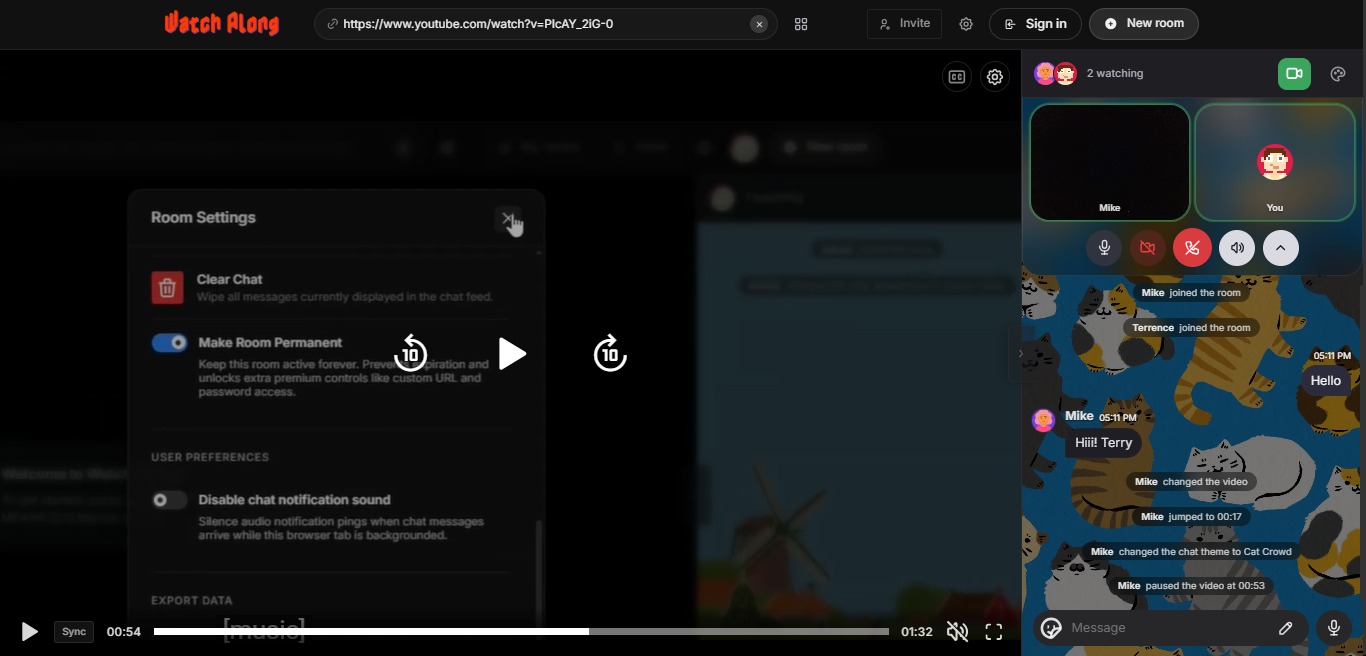
There's no separate app to open. No second device needed. Your friend's face is right there while you both watch — just like sitting on the same couch.
Video: How to create a WatchAlong.me room and watch together in sync
Setup: 1. Go to WatchAlong.me 2. Paste a video URL (YouTube, Vimeo, Dailymotion, or direct link) 3. Enable your camera when prompted 4. Share the room link with your friend — they join, enable their camera, and you're watching together face-to-face
Why Seeing Faces Makes Such a Difference
This is worth emphasizing, because some people skip video chat and just use text chat. Don't.
A shared film experience is fundamentally about shared emotions. When you watch a tense scene and you can see your partner physically tense up — that's connection. When you both burst out laughing at the same moment and see each other's faces — that's the memory you're building.
Text reactions ("lol" or "omg") are fine, but they're a flat representation of something that's genuinely happening in real time. The face cam preserves it.
This is especially important for couples — see our guide on how couples can watch movies together online for more on why video chat is the single biggest upgrade to a virtual movie night.
Tips for the Best Video Chat Movie Experience
Lighting matters. Make sure there's a light source in front of your face, not behind you. Even a lamp pointed toward you makes you 10x more visible on camera.
Use headphones. If you have your speakers on while your mic is open, the movie audio bleeds into your microphone and causes echo for the other person. Headphones solve this completely.
Keep the video chat window visible but small. Position your friend's face in a corner or sidebar — big enough to see, small enough not to block the movie. WatchAlong.me's layout does this automatically.
Mute during key scenes. If you or your partner are prone to talking during movies, agree on a "muted during the movie, open during pauses" rule. Less friction, more immersion.
Do a 30-second tech check first. Before you start the movie, confirm both cameras and microphones are working. Catching a mic issue before the opening credits beats discovering it 20 minutes in.
Alternatives That Include Video Chat
WatchAlong.me is the simplest option, but here are others worth knowing:
Kosmi — a full virtual room with video chat, though it requires account creation and feels heavier to use.
Discord (Go Live + Video Call) — you can run a video call in a Discord channel while someone screen shares. Not true sync, but familiar for Discord users.
Zoom + Teleparty — some people run a Zoom video call alongside a Teleparty session in the same browser window. Functional but a lot of setup for something that should be simple.
For a full comparison of all watch party platforms, see 10 best websites to watch videos together online.
Final Thoughts
The technology for watching movies together with video chat has never been better or more accessible. WatchAlong.me makes it trivially easy — one tab, one link, faces visible, movie in sync.
If you're watching with a partner, add this to your long-distance movie night ritual. If you're hosting a group, combine it with a proper virtual movie night setup. Either way, keeping the cameras on is the move.
Watch together, face-to-face, on WatchAlong.me — free, no sign-up
All 10 blogs written and optimized for WatchAlong.me | July 2026