

Kosmi had a strong vision: a virtual room where friends can watch videos, chat, and hang out online. And in many ways, it delivered. But as watch party tools have evolved, Kosmi's limitations have become harder to overlook — mandatory accounts, a sometimes slow interface, and a feature set that hasn't kept pace with more modern platforms.
If you're looking for a Kosmi alternative that feels lighter, loads faster, and offers more creative ways to enjoy content together — this guide is for you.
What Makes People Look for Kosmi Alternatives?
- Account required — you can't just drop a link and have friends join without signing up
- Interface overhead — Kosmi's virtual room concept adds complexity that many users don't need
- Limited video source support — no direct `.mp4` URL support, limited HLS streaming
- No drawing or annotation tools — once you discover platforms that let you draw together in real time, it's hard to go back
- Chat customization is basic — no themed backgrounds, limited sticker/reaction support
1. WatchAlong.me — Best Kosmi Alternative in 2026
WatchAlong.me is the top pick for anyone outgrowing Kosmi. It strips away the complexity and adds back the features that actually matter for a great watch party experience.
What WatchAlong.me Does Better Than Kosmi
No account required. Create a room, share a link, and your friends join instantly — no sign-up barrier on either side.
Real-time collaborative drawing. This is where WatchAlong.me genuinely stands out. While the video plays (or while you're waiting for everyone to join), you can open the drawing canvas and sketch, annotate, or circle things directly on screen — in multiple colors. Your friends see your drawings in real time. Point to a specific frame, sketch a reaction, or just doodle while you wait for the movie to start. No other mainstream watch party platform offers this.
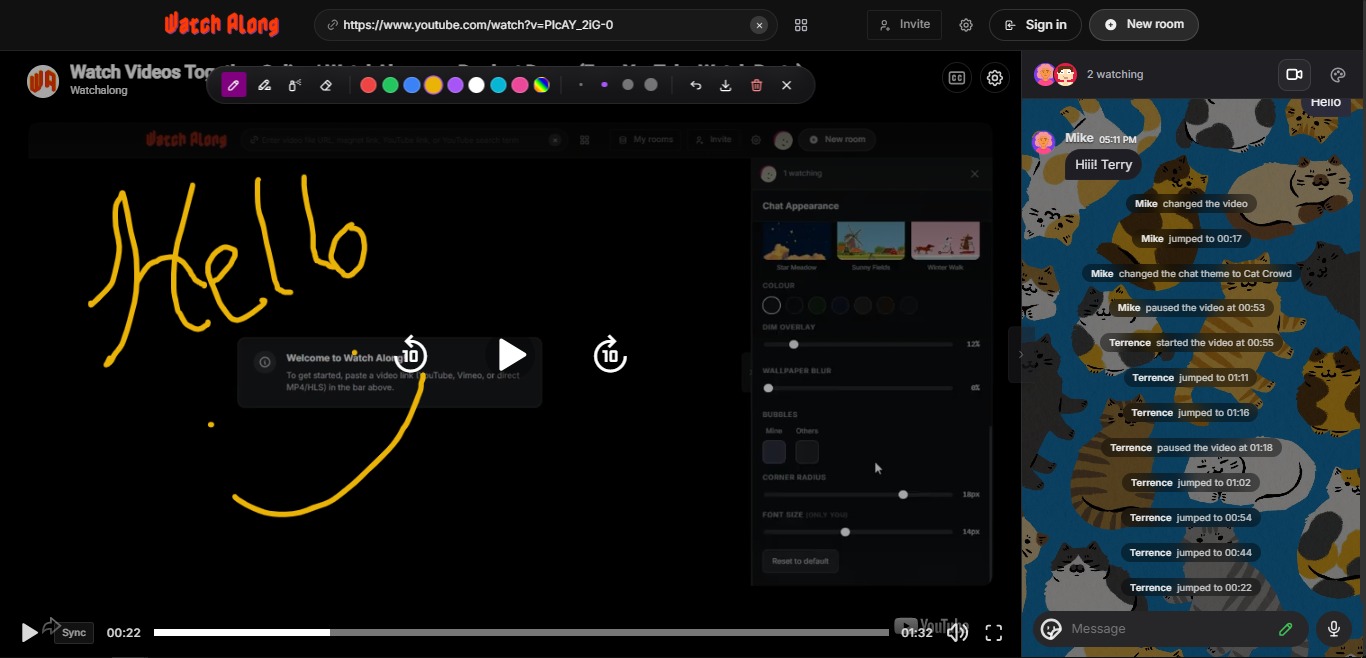
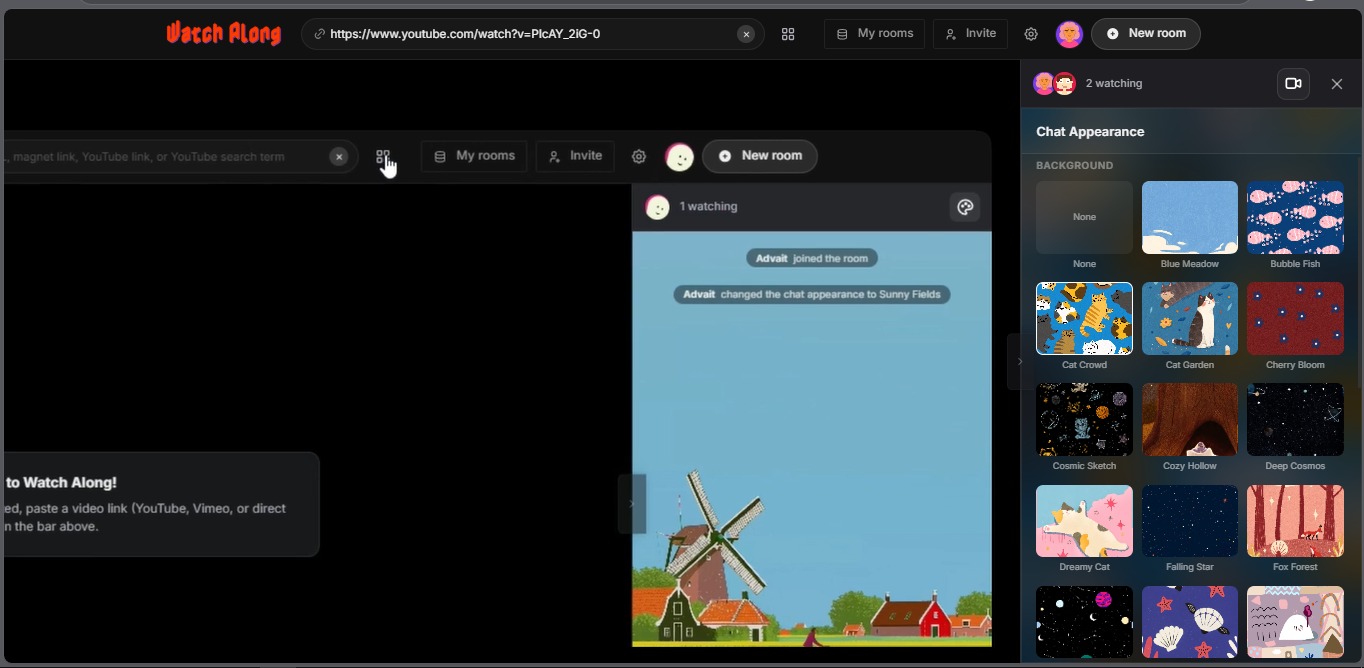
Chat themes. Instead of a generic black chat box, you can personalize the entire chat sidebar with illustrated backgrounds — Blue Meadow, Cat Garden, Cosmic Sketch, Deep Cosmos, Dreamy Cat, Fox Forest, and many more. It transforms the chat space into something that feels personal and fun, not like a generic app.
Chat stickers. React with stickers mid-movie without typing a word. The sticker reaction system keeps conversation flowing without breaking the watching experience.
Built-in video chat. See your friends' faces while you watch — all in one window, no Zoom required.
Supports more video sources. YouTube, Vimeo, Dailymotion, HLS live streams, and direct `.mp4` URLs — paste any link and it works.
Try WatchAlong.me free — no account needed
2. Watch2Gether
Watch2Gether is a long-standing platform with YouTube and Vimeo support. Guest access is available without an account, making it a lighter entry point than Kosmi.
Best for: Groups wanting a simple YouTube sync without registration Limitations: No video chat, no drawing tools, interface feels dated
→ Full comparison: Watch2Gether alternatives guide
3. Teleparty
Teleparty syncs Netflix, Disney+, and HBO Max for groups who share streaming subscriptions. Chrome extension required.
Best for: Groups with shared Netflix accounts Limitations: Extension-only, no YouTube support, no drawing or theme customization
→ Full comparison: Teleparty alternatives guide
4. Rave
Rave is a mobile-first app for watching YouTube, Netflix, and Google Drive content together. It's well-designed on mobile but has no desktop browser version.
Best for: Mobile users who prefer app-based experiences Limitations: No desktop version, requires account, no drawing tools
→ Full comparison: Rave app alternatives guide
5. Discord (Go Live + Video Call)
Discord's screen share combined with a video call is a familiar workaround for groups already using Discord as their main communication platform.
Best for: Existing Discord communities that want the path of least resistance Limitations: Screen share compresses video, no real sync, no drawing tools, no chat themes
→ Full breakdown: Discord vs dedicated watch party apps
6. Syncplay
Syncplay is a desktop application that syncs local media player playback (VLC, MPV) across users who have the same video file downloaded.
Best for: Power users watching high-quality local files together Limitations: Requires software install, file sharing, configuration — not beginner-friendly
Comparison: Kosmi vs WatchAlong.me
| Feature | Kosmi | WatchAlong.me |
|---|---|---|
| No account needed | — | ✓ |
| YouTube support | ✓ | ✓ |
| HLS / Direct URL | Limited | ✓ |
| Built-in video chat | ✓ | ✓ |
| Collaborative drawing | — | ✓ |
| Chat themes | — | ✓ (12+ themes) |
| Chat stickers | Limited | ✓ |
| Mobile browser | Partial | ✓ |
| Setup time | 3–5 min | Under 60 sec |
Final Verdict
For users who want Kosmi's social energy without Kosmi's friction, WatchAlong.me is the natural upgrade. The drawing tool alone is something Kosmi can't match — and combined with chat themes, stickers, and zero sign-up, it offers a genuinely more expressive and fun watch party experience.
Read also: best free watch party sites with no sign-up | how to video chat while watching a movie